Using "@" to refer to a specific context
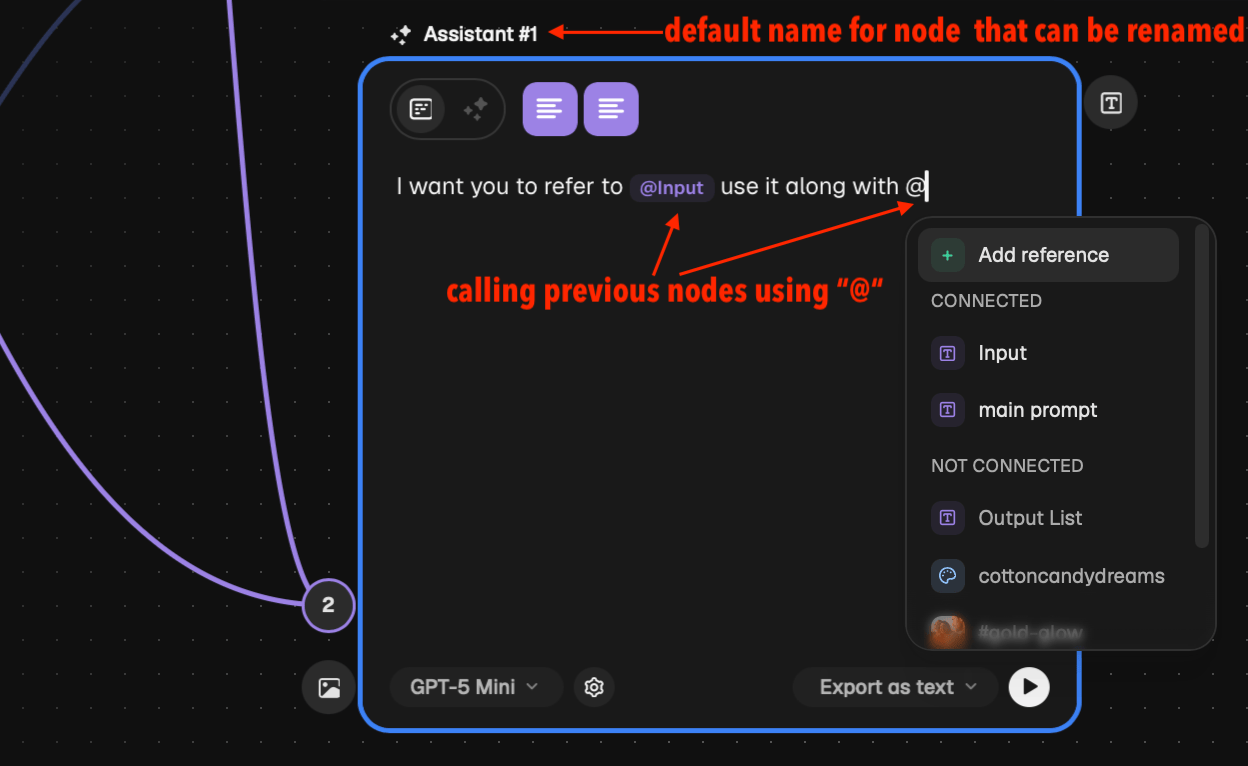
Currently, suppose a particular chat node is connected to, say, five other nodes for context. The issue is when I’m talking to the AI through this chat node, it’s very difficult to point out which of the five context nodes I’m referring to.
In some infinite‑canvas software like Spaces by magnific, this is solved by using the @ symbol and giving an option to name all the nodes (and giving them some sort of default name if no name is entered by the user). Now, whenever I’m talking to the chat node, I can just click the @ symbol, and all the context nodes pop up with their names. I can then select the specific one I want to refer to in my prompt to the AI.
I’m enclosing an image of the same from Spaces by magnific. This would be really useful; otherwise, it gets very confusing to refer to context while talking to the AI.
Log in to comment and vote
Comments7
Krishna - Remalt Dev
Jun 30
Hey @Akhilesh K ! The
@mention feature is officially live💯I attached a quick demo video showing how it works. You can now tag individual nodes or even grouped nodes directly in your prompt.
Also, one thing I felt was missing when I was testing Spaces by magnific was the ability to search for nodes by their actual content, so I made sure to add that capability here too! You can now search the picker not just by the node's name, but by the content inside it.
(Just a quick note: we have a known bug where a few thumbnails aren't loading in the picker menu yet, but we are working on a fix for that right now!)
Test it out and let me know what you think! ^^
Krishna - Remalt Dev
Jun 27
Love this idea, Akhilesh!
That would be a huge UX upgrade and really help the model focus on the right context. I'm going to dig into this and see what we can do!